As an Amazon Associate this site earns from qualifying purchases.
Short answer: the AKG K371 is one of the most realistic-sounding closed-back headphones under $200, and yes, you can absolutely use akg k371 mixing headphones no room treatment setups to produce mixes that translate to cars, earbuds, and club systems. Its frequency response closely tracks the Harman over-ear target curve, which was derived from a properly treated reference room, so what you hear through the K371 approximates what a mix would sound like in an ideal studio—even if your bedroom has parallel walls, hardwood floors, and a window behind your desk.
That said, mixing on headphones is a discipline. Even a flat, accurate pair like the K371 won't save you from poor monitoring habits, fatigue-induced bass decisions, or the lack of crossfeed that makes stereo imaging feel exaggerated on cans. This guide walks through why the K371 punches above its price for untreated-room mixing, how to calibrate your workflow around it, what limitations to plan for, and which complementary tools (a measurement mic, a crossfeed plugin, a second reference pair) tighten the loop without forcing you to build a soundproof booth.
Finding the right akg k371 mixing headphones no room treatment comes down to matching the features to how you will actually use it.
Why the AKG K371 Works Well Without Room Treatment
The case for mixing on the K371 in an untreated room comes down to one thing: tonal accuracy. When AKG released the K371 in 2019, they tuned it to follow the Harman target curve published by Sean Olive and Todd Welti at Harman International. That target was built by measuring how trained listeners preferred music to sound when reproduced through high-end speakers in a well-treated room. In other words, the K371 is designed to give you the perceptual experience of mixing in a good room—through headphones.


This matters because untreated rooms lie to you. A 12-by-10 bedroom with drywall on every side will have standing waves between 40 Hz and 200 Hz that pile up by 10 dB or more at certain frequencies and null out completely at others. Move your head six inches and the low end changes. You cannot mix bass on speakers in that environment without measurement and correction. Headphones bypass the room entirely—you're listening through a sealed cup against your ear, with no reflections, no nulls, no comb filtering.
The K371's closed-back design also isolates roughly 15 to 20 dB of outside noise, which is enough to let you work next to a noisy refrigerator, a partner watching TV in the next room, or street traffic without bleeding into your monitoring. For renters, dorm dwellers, and parents recording after the kids are asleep, this is a bigger deal than spec sheets suggest.
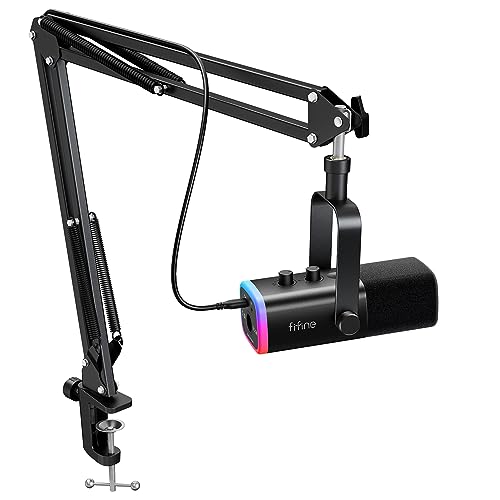
- Vibrant RGB Light-The streaming microphone RGB illuminates your gaming setup with customizable RGB lighting for a visually stunning game experience. You can easily control the RGB
- Enhanced Features-Featured -50dB sensitivity and cardioid polar pattern, the USB recording mic kit not easily pick up background noise for delivering clear audio. The PC gaming

What the K371 Actually Sounds Like
Out of the box, the K371 has a slightly warm, smooth presentation. Bass extension reaches down to roughly 25 Hz with audible (not just measurable) energy, the midrange is neutral without the scooped "V" shape common in consumer headphones, and the treble is gently rolled off above 10 kHz. That treble roll-off is the main characteristic mix engineers debate—some find it relaxing for long sessions, others worry it hides sibilance and cymbal harshness.
In practice, the roll-off is mild enough that with a few sessions of calibration—A/B-ing your mixes against commercial references in the same genre—you'll learn to compensate. Many engineers add a +2 dB shelf above 8 kHz on the headphone bus (not the mix bus) as a monitoring tweak to brighten the response while keeping the actual mix decisions flat.
Building an akg k371 mixing headphones no room treatment Workflow
Owning the K371 is step one. Building a workflow around it is what produces translatable mixes. Here is the sequence most engineers settle into after a few months with the headphones.
1. Reference religiously. Pick five commercial tracks in your target genre that you know sound great on every system. Load them into your DAW at -14 LUFS, level-match them to your mix, and switch between them every ten minutes. You're calibrating your ears to the K371's signature, not the song's.
2. Use crossfeed. Headphones present a hard-panned mix differently than speakers do. A guitar panned 100% left hits only your left ear on headphones, while on speakers, both ears hear it with a slight delay and level difference. Crossfeed plugins like Goodhertz CanOpener, Toneboosters Morphit, or the free TB Isone simulate this. Insert one on your monitoring path (not the mix bus) and stereo decisions will translate far better.
3. Check on a second source. Before you call a mix done, listen on your phone speaker, a Bluetooth speaker, and a car. The K371 will get you 90% of the way there, but cheap consumer playback systems reveal mid-range balance issues no headphone can predict.
4. Mix at moderate levels. Headphones encourage loud listening because you're isolated. Keep your monitoring at conversational level—around 70 to 75 dB SPL—to preserve your hearing and avoid the loudness contour bias that makes bass and treble sound exaggerated.
5. Take breaks. Ear fatigue is real and it compounds. Twenty minutes on, ten minutes off. Step out of the room entirely during breaks so your hearing resets.
Limitations You Should Plan Around
The K371 is not magic. Three limitations show up consistently when engineers move from speakers to headphone-only mixing in an untreated room.
Stereo width judgment. Headphones make everything sound wider than it actually is on speakers. A reverb that feels lush and spacious on the K371 may sound subtle or absent in a car. Crossfeed helps, but you'll still tend to undersell width on headphones. Counter this by deliberately pushing stereo elements wider than feels "right" and then verifying on a speaker.
Sub-bass decisions. The K371 has real sub-bass response, but you're feeling it in your ear canal, not your chest. Kick drum punch and 808 weight are perceived differently when bass hits your body versus only your eardrum. Spectrum analyzers and reference tracks become essential for low-end sanity checks.
Depth perception. Front-to-back depth—the sense that one element is closer and another farther away—relies partly on early reflections that speakers provide and headphones don't. This is the hardest skill to develop on cans. Listening to well-mixed orchestral or jazz recordings on the K371 trains your ear faster than any plugin.
Complementary Gear That Tightens the Workflow
You don't need a treated room to mix professionally on the K371, but a few inexpensive additions sharpen the workflow.
A Calibrated Crossfeed or Headphone-Correction Plugin
Tools like Sonarworks SoundID Reference apply a measured correction curve specific to your K371's serial-number-level response and add optional speaker simulation. The K371 is one of the supported models with a factory profile. This is the single highest-ROI addition for headphone mixing—it removes the small remaining tonal inaccuracies and lets you audition your mix as if it were playing through monitors in a treated room.
A Second Reference Pair
Once you know the K371 intimately, a contrasting second pair catches issues your daily driver misses. Many engineers pair the K371 with a brighter, more analytical headphone like the Sennheiser HD 600 (open-back, classic neutral) or the Sony MDR-7506 (bright, mid-forward) and switch between them during the final 20% of a mix. Our breakdown on the ATH-M50x versus MDR-7506 covers two budget-friendly options if you want a contrasting second pair.
A Measurement Microphone (Optional)
If you ever do add speakers down the road, a $75 measurement mic plus free software like Room EQ Wizard lets you see exactly what your room is doing. Even if you're committed to headphones, running a measurement once a year reveals whether your seating position has drifted into a worse spot.
Acoustic Panels Behind the Listening Position
This contradicts the headline, but it's worth mentioning: a single 2-by-4-foot panel of 2-inch rigid fiberglass behind your head costs about $40 to build and dramatically reduces the reflections that bleed past the K371's earcups during quiet passages. It's not room treatment in the studio-acoustics sense—it's just one panel—but the benefit-to-effort ratio is excellent. Our guide to reducing echo in a home studio walks through other low-effort improvements.
Who the K371 Is Not For
If you mix primarily classical, jazz, or acoustic music where spatial depth and instrument placement are central to the genre, an open-back headphone like the HD 600, HD 660S2, or Audeze MM-100 will serve you better. The K371's closed-back design trades some soundstage realism for isolation and bass extension. For electronic music, hip-hop, pop, podcast post, and rock—where translation across consumer playback systems matters more than soundstage—the K371 is hard to beat at any price near $150.
It's also not the right tool for recording vocals in the same room as the singer. The closed-back isolation is good but not perfect, and the K371's tendency to roll off treble can mask sibilance the engineer needs to catch live. Use a brighter, tighter pair for tracking and save the K371 for mixdown.
Setting Up Your Mixing Position
Even with headphones, where you sit matters. The K371 weighs 255 grams—light enough for long sessions but heavy enough that posture affects fatigue. Sit upright, keep the cable routed so it doesn't tug on one cup, and place your interface within arm's reach so you're not reaching across the desk to change monitoring level mid-mix.
Connect to a real headphone amplifier or a quality audio interface. The K371 is 32 ohms and only 114 dB/V sensitive, which means cheap interfaces with weak headphone outputs will drive it loud enough but may sound veiled and dynamically flat. Most modern interfaces from Focusrite, Universal Audio, MOTU, or RME have headphone amps strong enough to wake the K371 up. If you're still shopping for an interface, our roundup of the best audio interfaces in 2026 covers options with solid headphone outputs.
A Realistic Timeline From Unboxing to Reliable Mixes
Expect a calibration period. Week one, your mixes will sound great on the K371 and inconsistent everywhere else. Week two through four, you'll start identifying systematic biases—maybe you're always overcooking the 200 Hz region, or undermixing reverb tails. By month three, most engineers report their headphone mixes translate as reliably as their speaker mixes did in a marginal room. The akg k371 mixing headphones no room treatment approach works, but it works because you've done the calibration work, not because the gear is magic.
Frequently Asked Questions
Can you really mix professionally on the AKG K371 in an untreated bedroom?
Yes, with caveats. Many professional engineers use the K371 as a primary or backup mixing tool, especially when traveling or working in rooms that can't be treated. The keys are reference tracks, crossfeed, and verifying mixes on at least one other playback system before committing.
Is the AKG K371 better than the Audio-Technica ATH-M50x for mixing?
For mixing specifically, yes. The K371 has a flatter, more accurate response that follows a research-derived target curve, while the M50x has a boosted bass and treble shelf that flatters music but misleads mix decisions. The M50x is fine for tracking and casual listening; the K371 is purpose-built for critical work.
Do I need Sonarworks or another correction plugin with the K371?
Not strictly required, but recommended. The K371 is already close to the Harman target, but Sonarworks SoundID Reference applies the final corrections and adds optional speaker simulation, which is the closest you can get to mixing in a treated room while wearing headphones.
Will the K371 work with my phone or laptop headphone jack?
Yes, it's efficient enough to play loud from a phone or laptop. For critical mixing, though, route it through an audio interface or dedicated headphone amp—the K371 reveals more detail and dynamic punch when properly driven.
How does the AKG K371 compare to open-back headphones for mixing?
Open-back headphones like the Sennheiser HD 600 generally have a more natural soundstage and front-to-back depth, but they leak sound and offer no isolation. The K371's closed design is better for shared living spaces and tracking-adjacent work; an open-back may edge it out for purely critical mixing in a quiet room.
What's the best workflow for checking bass on headphones?
Use a spectrum analyzer on the master to verify the relative balance of 40 Hz, 80 Hz, and 160 Hz, A/B against three reference tracks in your genre, and listen at consistent moderate level. If possible, check the final mix once on a subwoofer or a car system to confirm the body and weight translate.
Should I get the K371 or upgrade my room first?
If you have less than $500 and an untreated room, the K371 plus Sonarworks (around $250 total) will produce more accurate mixes than the same money spent on a few foam panels. Real room treatment that meaningfully changes a small room's low-end behavior starts around $1,500 in materials. Headphones are the better starting point. Once you're consistently producing translatable mixes, then invest in the room.
Final Thoughts
The AKG K371 has changed what's possible in a bedroom studio. Ten years ago, mixing on headphones meant accepting compromises that pros wouldn't tolerate. Today, the combination of a research-tuned headphone like the K371, a correction plugin, and disciplined reference-track workflow produces commercially competitive results from a kitchen table. If your room is untreatable—rented, shared, oddly shaped, or just unfinished—the K371 is the most pragmatic path to mixes that translate. Pair it with good habits, and the room stops being the bottleneck.
For broader gear context, see our 2026 roundup of the best studio headphones for recording or our overview of key considerations when buying headphones for a home studio.
Key Takeaways
- Choosing the right akg k371 mixing headphones no room treatment means matching the key features to your specific needs and budget
- Read real customer reviews and check the return policy before you commit
- Also covers: k371 reference mixing untreated
- Also covers: akg k371 closed back mixing
- Also covers: k371 bedroom mixer headphones
- Compare value across models — the priciest option is not always the best fit