Last Updated: July 7, 2026
There's a viral thread bouncing around r/BuyItForLife right now where a couple received two premium kitchen tools at their wedding shower and had to pick which one to keep. The comments spiraled into a broader debate that podcasters and streamers will recognize instantly: is it smarter to buy the well-known, well-marketed brand, or the utilitarian workhorse that a decade of hobbyists swear by?
We're seeing the same conversation play out in home studio forums this week. People are tired of replacing plastic-body USB mics every 18 months. They want gear that survives coffee spills, tour bags, and toddlers. So we pulled together a Buy-It-For-Life-style breakdown for podcast and streaming mics, using the same decision framework the Reddit thread wrestled with: what actually lasts, what earns its shelf space, and what's just noise.
TL;DR / Quick Answer
If you want one mic that will still be useful in five years, get a dynamic USB/XLR hybrid like the FIFINE AmpliGame AM8. Dynamic capsules reject room noise, and XLR compatibility means the mic outlives whatever computer you own today. Skip anything under $25 with a plastic yoke, and skip the $300 "influencer" bundles unless you actually need a mixer.
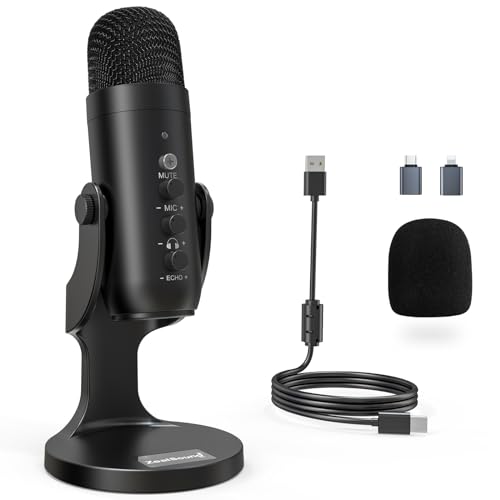
- Studio-Quality Sound for Clear Podcast Recording – The K66 USB podcast microphone delivers studio-quality, broadcast-level audio using a high-performance condenser capsule and
- Intelligent Noise Reduction Mode for Cleaner Podcast Audio – This podcast microphone features an advanced Noise Reduction Mode designed for clearer, more focused voice recording
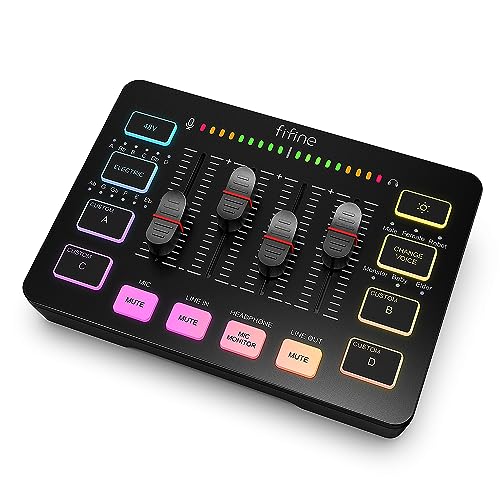
- [XLR Mic Input] One XLR microphone input interface is set on the gaming audio mixer, which is great to up your audio quality with your XLR setup. The XLR mixer is a stepping stone
- [Individual Channel Control] Gaming audio mixer for one mic recording with smooth volume slider fader take your streaming recording to a whole new level with full pleasure. Four
Why the Buy-It-For-Life Mindset Matters for Podcast Gear
Audio gear has a weird lifespan curve. A $30 mic and a $300 mic can both sound acceptable on day one. The difference shows up in year three, when the cheap mic's USB port wiggles, the foam windscreen has crumbled, and the plastic mount cracks the first time someone bumps the desk.
The Reddit thread that kicked this off had a great line in the top comment: "buy the boring one that repair techs still stock parts for." That translates directly to microphones. The mics that survive are the ones with metal bodies, standardized threading, and a signal path that doesn't rely on a proprietary chip inside the cable.
The two lifespan killers
First, connector fatigue. USB-C and micro-USB ports on inexpensive mics are soldered directly to a small internal PCB, and repeated cable stress eventually breaks the joint. Second, capsule contamination. Condenser capsules are extremely sensitive to humidity, dust, and plosive spit. Dynamic capsules, which use a moving coil similar to a loudspeaker in reverse, are far more forgiving. Wikipedia's overview of dynamic microphone construction is a solid primer if you want the physics.
Our Top Picks for Long-Lasting Home Studio Mics
Every mic on this list was chosen with durability, repairability, and version flexibility in mind. We list honest weaknesses for each one because no piece of gear is perfect.
1. FIFINE AmpliGame AM8 - Best All-Around Buy-It-For-Life Pick
The AM8 is a dynamic microphone with both USB and XLR outputs. That dual-output design is the single most important feature on this list. You can start it plugged straight into your laptop today, and five years from now when you finally buy a proper audio interface, the same mic still works.
Feature highlights based on the product listing: dynamic capsule (better ambient noise rejection than condensers), USB and XLR outputs, a mute button, a headphone jack for zero-latency monitoring, RGB lighting, and an included desktop stand.
Trade-offs: The included desktop stand is fine for a static seated setup but flexes if you type aggressively on the same desk. The RGB lighting cannot be fully disabled on all firmware revisions, which some radio-style users find distracting. At $44.99, it's still one of the strongest value propositions in the category.
2. FIFINE AmpliGame AM8T - Best Complete Starter Kit
The AM8T is essentially the AM8 packaged with a boom arm stand. If you're setting up a home podcast studio from scratch and don't already own a boom arm, this bundle usually costs less than buying the mic and arm separately. It's the same dynamic capsule and same USB/XLR dual output, just with the mounting hardware included.
Feature highlights: dynamic capsule, XLR and USB connectivity, boom arm included, mute button, headphone jack, and RGB.
Trade-offs: Included boom arms in this price bracket tend to squeak when adjusted mid-recording. Most reviewers grease the springs or replace the arm within the first year if they record daily. That's still a fifteen-dollar fix, not a fifty-dollar one, so the bundle math still works out. At $54.99, the extra ten dollars over the standalone AM8 is basically the cost of a serviceable arm.
3. ZealSound Podcast Microphone - Best Budget Backup Mic
Not everyone needs a $50 mic on day one. If you're testing whether podcasting or streaming is even something you'll stick with, the ZealSound at $26.61 gets you into the game. It's a USB microphone with a built-in gain knob, volume adjustment, mute button, and even a monitoring/echo feature that lets you hear yourself in real time without an interface.
Feature highlights per the listing: USB connection, noise cancellation, physical gain control, volume adjustment, mute, monitoring with echo effect, and multi-device compatibility including iPhone, iPad, Android, Mac, and PC.
Trade-offs: This one is USB-only, so it doesn't fit the pure buy-it-for-life criterion the way a hybrid does. If your laptop's USB standard shifts or you eventually move to an XLR interface, the ZealSound becomes a backup mic rather than your main. The echo effect is fun for karaoke but should be disabled for actual podcast recording, since it colors the tone. Still, at this price, it's an easy "keep in the drawer as a spare" pick.
4. FIFINE AmpliGame SC3 - Best When You Outgrow USB
The SC3 is not a microphone. It's the mixer you buy when you've decided this hobby is sticking around. It has an XLR microphone interface with 48V phantom power, individual channel control, a volume fader, and a mute button. The phantom power is the important spec here, because it means you can eventually plug in a condenser mic if your recording space is treated properly.
Feature highlights: XLR input with 48V phantom power, individual control per channel, volume fader, mute button, RGB lighting, and USB output to your computer.
Trade-offs: This is a category jump. If you're a solo podcaster who never plans to bring on a co-host or a second mic, you don't need this. You'd be paying for capability you'll never use. Also, mixers add a small learning curve. Gain staging is not intuitive to newcomers, and setting phantom power on when a dynamic mic is connected won't damage the mic but can produce loud pops during setup. The XLR connector standard on Wikipedia is worth a quick read if the three-pin conventions are new to you.
Who This Is For
The right mic depends heavily on what you're actually recording and where. Three profiles cover roughly 80% of readers.
The Solo Podcaster in an Untreated Room
You record in a bedroom, a home office, or a corner of the living room. There's a heating vent, a laptop fan, and possibly a partner on a work call in the next room. You are the exact person a dynamic mic was invented for. The AM8 or AM8T will make your recordings sound like they were captured in a much quieter space than they actually were. Skip condensers until you can dedicate a treated room.
The Twitch or YouTube Streamer
You're on camera, your audience is casual, and you want the setup to look good on stream. The RGB lighting on the AM8/AM8T is a feature, not a bug, for this audience. You'll appreciate the physical mute button because it's easier to hit than a keyboard shortcut mid-scream. If you plan to have a co-streamer join in person eventually, the SC3 mixer becomes relevant. Otherwise, one AM8 does the job.
The Newcomer Testing the Waters
You haven't committed to anything yet. You want to record a couple episodes, put them on YouTube or Spotify, and see if this hobby sticks. The ZealSound is the honest recommendation here. Spending $200 before you know whether you enjoy podcasting is a classic beginner mistake. If you fall in love with the process, you upgrade to the AM8 and keep the ZealSound as a backup or a travel mic.
What to Look For: A Home Studio Mic Buyer's Guide
Here's what actually matters when you're evaluating any podcast or streaming microphone, ranked roughly by long-term impact.
Dynamic vs. Condenser Capsule
This is the single biggest technical decision. Dynamic mics use a moving coil, tolerate loud sources without distorting, and are far less sensitive to room noise. Condenser mics use a charged diaphragm that captures much more detail, including detail you don't want, like your dog three rooms away. For untreated home spaces, dynamic wins almost every time. All three microphones on this list use dynamic capsules, which is not an accident.
USB, XLR, or Both
USB mics are plug-and-play but tied to your computer's driver stack. XLR mics require an interface or mixer but connect to essentially any professional audio device made since 1955. Hybrid mics with both outputs are the best of both worlds and cost roughly the same as USB-only mics from established brands. If your budget can stretch to a hybrid, take it.
Build Quality and Repairability
Look for metal grille construction, an all-metal body, and a removable capsule assembly if possible. Cheap plastic mounts are the first thing to break. Also check whether replacement windscreens and pop filters exist for the specific model; when the foam disintegrates in three years, you want to be able to buy a $6 replacement instead of tossing the whole mic.
Onboard Controls
A physical mute button is not a luxury. It's the difference between a smooth recording and a two-minute post-production edit every time someone knocks on your door. A gain knob on the mic body itself lets you adjust levels without opening software. A headphone jack for direct monitoring means you catch problems as they happen, not in editing.
Stand and Mounting Included
Some mics ship with a stand that's fine for permanent desk placement. Others assume you already own a boom arm. Verify what's in the box. A boom arm bundle can save $20-40 versus buying separately, but the included arms are usually mid-tier at best.
Value Over Time
The cheapest mic is rarely the best value. A $27 mic that gets replaced in 18 months costs more over five years than a $45 mic that lasts the whole span. Pay attention to warranty length, the manufacturer's track record for firmware updates on USB models, and the availability of user-replaceable parts.
What We Don't Recommend
A few purchase patterns come up constantly in home studio communities, and they're almost always mistakes.
The $15 Amazon Special
Every few months a no-name USB mic appears at fifteen dollars with 4,000 reviews. The reviews are usually incentivized, the capsule is a generic electret condenser, and the mic body is entirely plastic. It will work for a week and then develop a rattle. Save the money and add it to a real purchase.
The Overpriced Influencer Bundle
On the other end, there are $250-400 "streamer starter kits" that bundle a decent mic with a mediocre boom arm, a foam pop filter you don't need, and a shock mount you'll never use. The individual components rarely justify the bundle price. Buy the mic and interface you actually need separately.
Condenser Mics for Untreated Rooms
Sub-$100 large-diaphragm condensers get pushed hard on social media because they sound impressive in a treated studio. In a bedroom with hardwood floors and a ceiling fan, they sound worse than a $40 dynamic. Match the mic to your space, not to the aesthetic.
USB Hubs Between Mic and Computer
If you buy a USB mic, plug it directly into your computer, not through a USB hub. Cheap hubs introduce ground loop noise and can starve the mic of power, causing dropouts. This is not a mic problem; it's a topology problem, and it fools a lot of new users.
FAQ
Is a dynamic mic really better than a condenser for home podcasting?
In an untreated room, almost always yes. Dynamic capsules pick up sound in a much tighter pattern and reject reflections off walls and ceilings. Condensers pick up everything, including the ceiling fan and the neighbor's leaf blower. If you can't dedicate a closet or spare bedroom with acoustic treatment, go dynamic.
Do I need XLR if I'm only podcasting on my laptop?
Not today, but future-you will thank present-you. A USB/XLR hybrid mic like the AM8 costs about the same as a USB-only mic from a comparable brand, and gives you an upgrade path to a real audio interface without buying a new microphone. If your budget forces a choice, USB-only is fine to start.
How long should a good podcast mic actually last?
A well-built dynamic mic with metal construction can easily last ten to fifteen years of home use. Broadcast studios still use dynamic mics from the 1970s. Cheap plastic-body USB mics are typically 18 to 36 months before something fails. That's the buy-it-for-life gap in a nutshell.
Do I need phantom power?
Only if you use a condenser mic. Dynamic microphones are self-powered by the movement of the coil and do not need phantom power. All three microphones on this list are dynamic, so phantom power is irrelevant unless you upgrade later. The SC3 mixer provides 48V phantom power for future condenser use.
What about noise cancellation software instead of a dynamic mic?
AI noise suppression tools like Krisp and NVIDIA Broadcast are impressive, but they're a bandage, not a solution. They introduce artifacts on your voice, especially on sibilants and breath sounds. Starting with a mic that rejects noise in hardware is a cleaner signal path than fixing noise in software after the fact. Use both if you want, but don't rely on software alone.
Should I worry about polar patterns?
For solo podcasting, a cardioid pattern is what you want, and it's what the mics on this list use by default. Cardioid means the mic picks up sound from directly in front and rejects sound from behind. If you plan to record interviews with two people sharing one mic, you'd want a bidirectional or figure-eight pattern, which most sub-$100 mics don't offer.
The Bottom Line
The Reddit thread that inspired this article ultimately came down to a simple question: which piece of gear will still be earning its shelf space in ten years? For podcast and streaming mics, that answer points hard toward dynamic capsules with hybrid USB/XLR outputs and metal construction. The FIFINE AmpliGame AM8 and AM8T hit that target for under $60. The ZealSound is a legitimate budget entry point. The SC3 mixer is where you go when the hobby becomes a habit.
Buy the mic that matches your room, your budget, and your one-year plan, not the mic that trends on TikTok this week. The gear you don't have to replace is always the best deal.